

.png)


MED-EL
Published May 11, 2026
OTOGUIDE: A New Precision Surgery Tool for Individualized Cochlear Implantation
OTOGUIDE: Precision you can see. You know OTOPLAN,* OTODRIVE,** and OTOARM. And now there’s OTOGUIDE, our new intraoperative software that enables you to see electrode array insertion like never before.
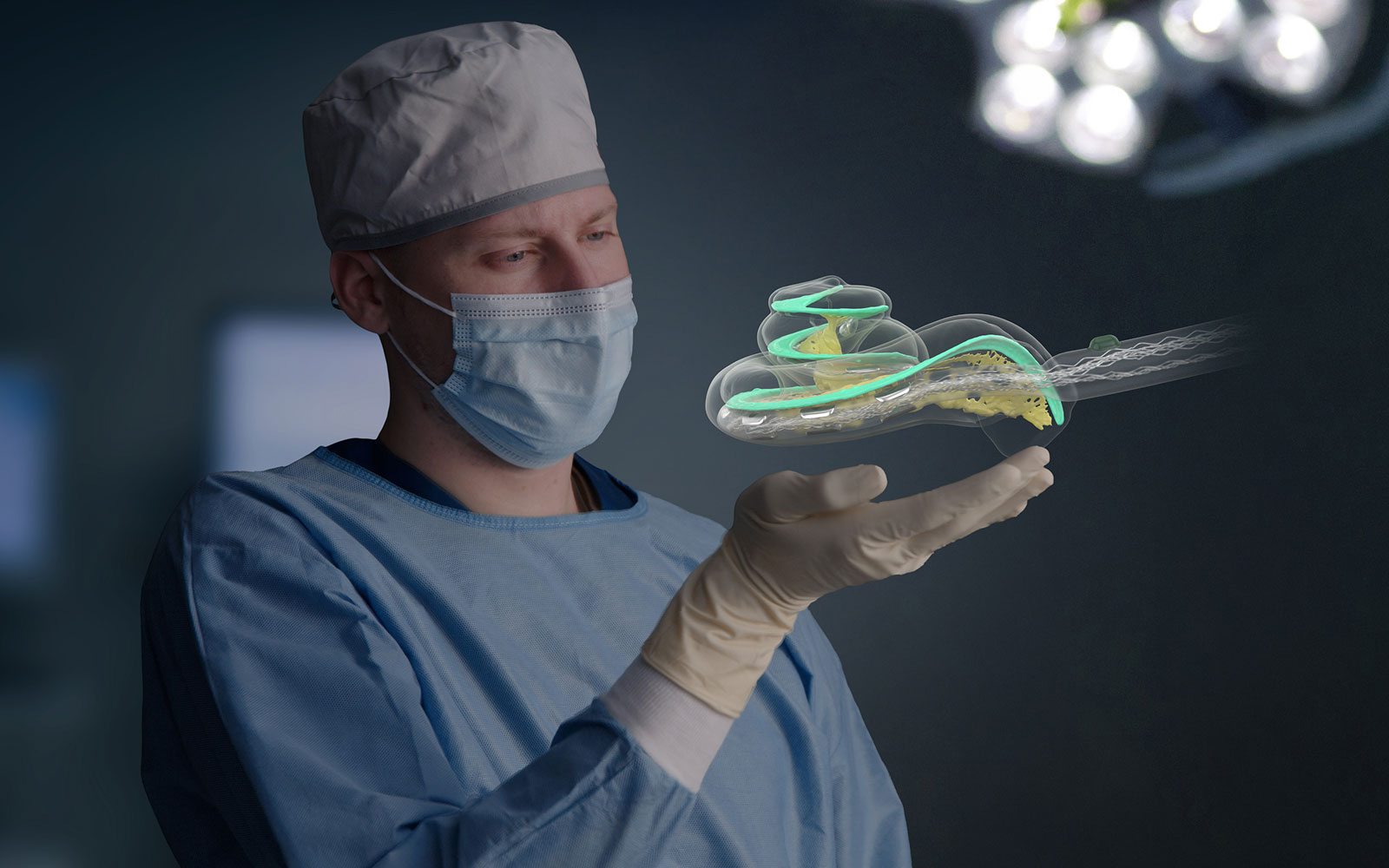
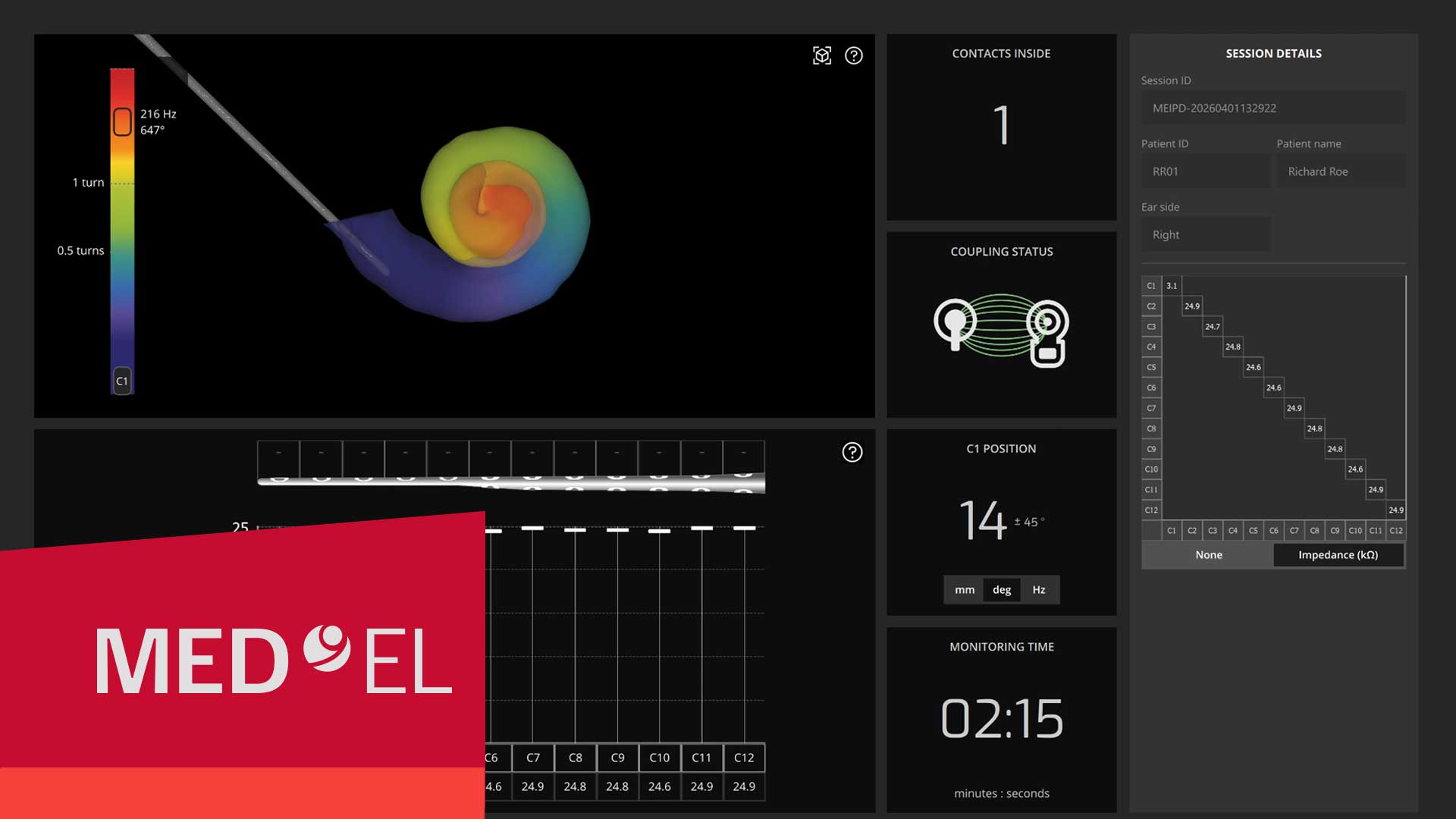
The OTOGUIDE insertion monitoring software can support confirming electrode placement for more confidence throughout the insertion process. It provides a precise, individual representation of electrode array insertion along with intraoperative information such as insertion status and a live impedance matrix.
Patient-Specific 3D Visualization
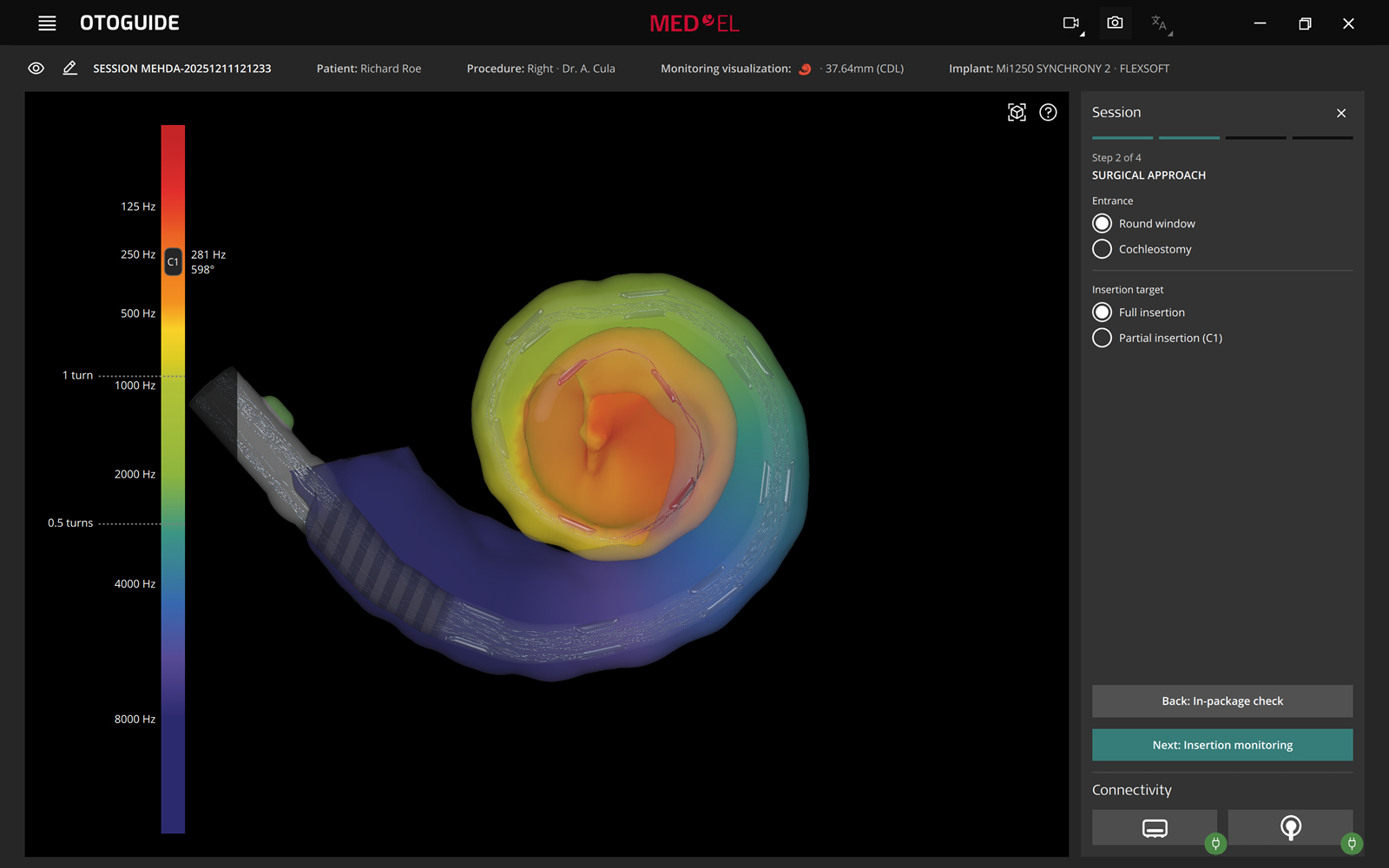
If you currently use OTOPLAN, you will be familiar with the surgical planning software’s ability to generate a patient-specific 3D model of the cochlea. When used in combination with OTOPLAN, OTOGUIDE enables you to see the estimated electrode position within the patient-specific 3D cochlear model imported from OTOPLAN.
Discover What’s New in OTOPLAN
Implant placement planning for PMEIs, radiation-free CI electrode visualization with MR imaging, macOS support, and more come with OTOPLAN’s 2026 update.
Learn MoreThere are also options for using OTOGUIDE without OTOPLAN. By providing cochlear parameters, you can see a 3D visualization of the electrode array’s insertion path, just not within a patient-specific cochlear model. This variation also provides you with electrode position estimates.
And even without providing any cochlear information, you will still be able to use OTOGUIDE to see the live impedance matrix, graph, and status so you can monitor the insertion based on that information.
Automatic Contact Detection
OTOGUIDE provides a visualization of electrode position and indicates how many electrode contacts have been inserted into the cochlea. The default setting for the surgical approach is a full, round window insertion. You can also adapt the settings for non-default approaches to improve the precision of the estimated final electrode position. For a cochleostomy, you can provide the distance from the round window. And for a partial insertion, you can provide the insertion target—an acoustic indicator will let you know when you have reached this target.
Real-Time Insertion Status
In addition to showing the number of contacts inserted, OTOGUIDE also displays the linear depth, angular depth, and the frequency that corresponds to the location of the first contact in real time. This detailed information gives you and your team insight into the insertion process like never before.
Impedance Values at a Glance
There are three ways to quickly see impedance values: in the graph, table, or matrix. You can choose a version of the impedance matrix that shows all the values, or you can select the streamlined version that displays only the main diagonal, depending on how much detail you would like to see.
The impedance matrix develops live, providing you with real-time insights into what is going on inside the cochlea during the insertion process.
Simple Features That Make a Big Difference
For extra peace of mind before you even begin surgery, you can use OTOGUIDE’s in-package check to measure the channel statuses and ensure the integrity of the device—before you even open the box.
Two additional on-screen features in OTOGUIDE are the total monitoring time and the coupling check. By seeing the total monitoring time, you can better gauge the slowness and steadiness of the insertion you are performing. And with the coupling check, you’ll always be certain of the coupling status with the implant.
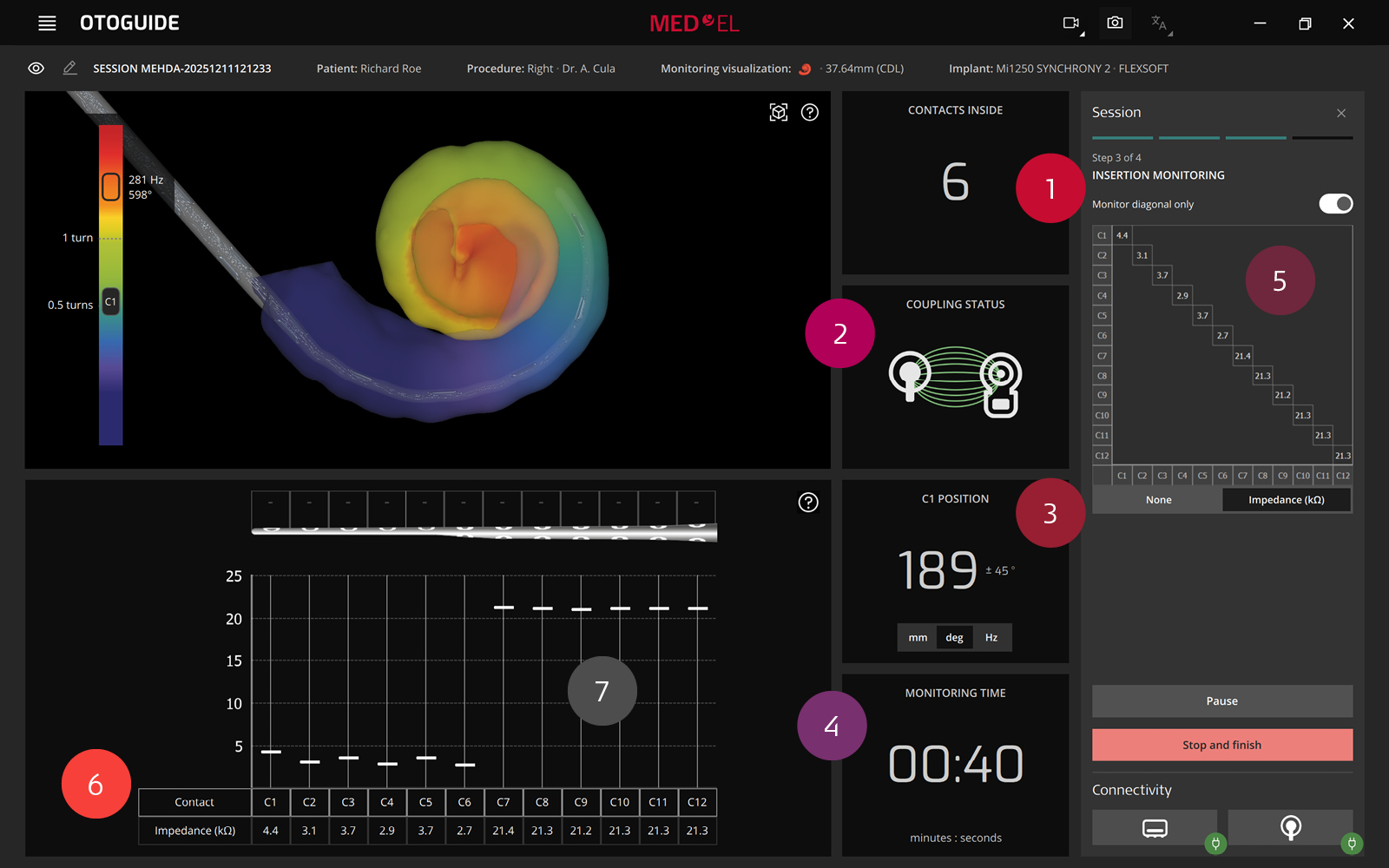
- Automatic contact detection
- Coupling check
- Linear depth/angular depth/frequency
- Total monitoring time
- Impedance matrix
- Impedance table
- Impedance graph
Customizable Replay Monitoring
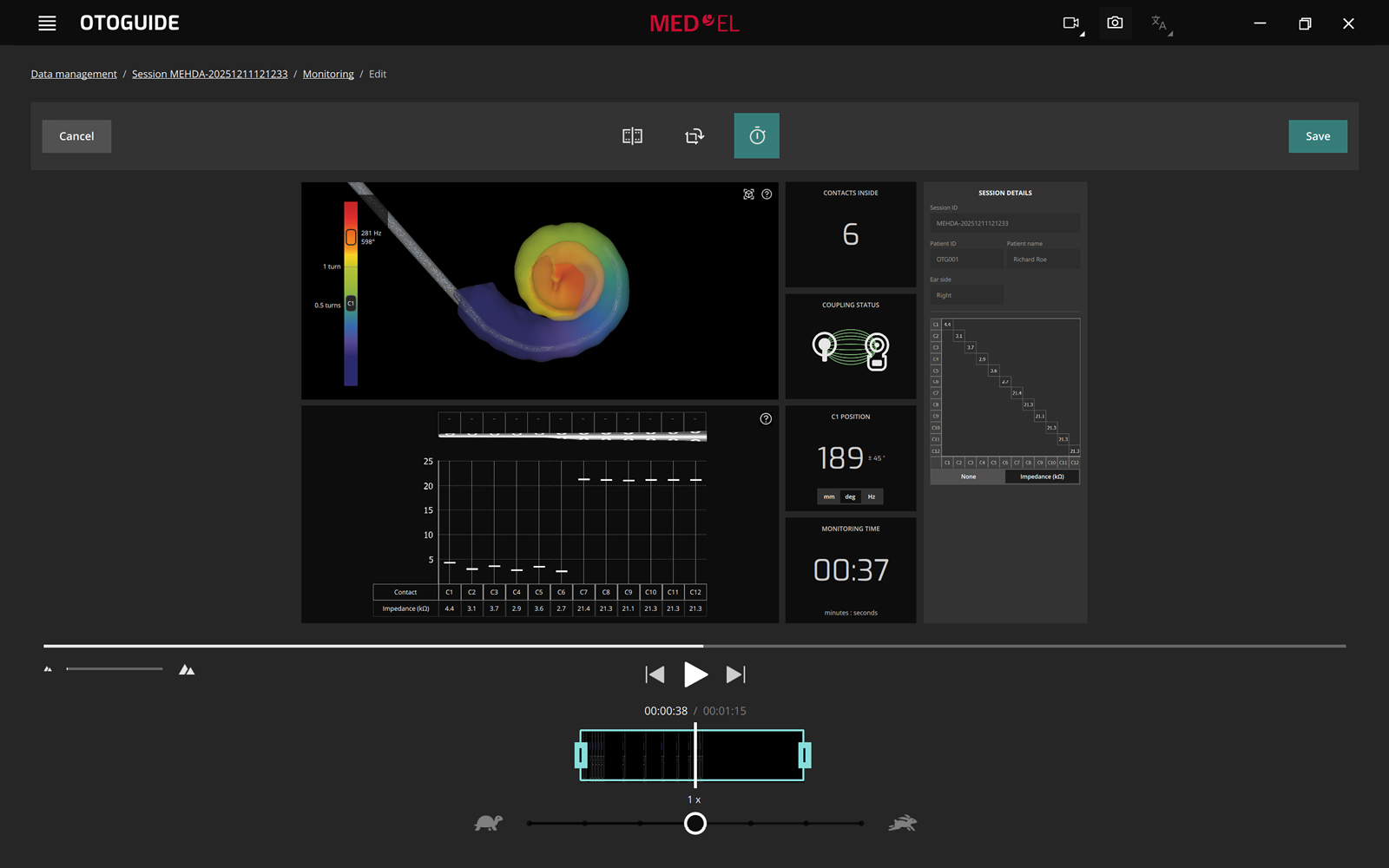
Whether you like to reflect on cases for your own personal growth or you value sharing them for teaching purposes, replay monitoring can be a valuable tool for you. Each insertion is recorded automatically, and later, you can adapt the recording to best suit your needs.
You can adjust the angle at which the cochlear model is displayed, change which insertion information is displayed in the video, and you can also cut, crop, and adjust the replay speed—all directly in OTOGUIDE. Then simply export the customized video.
Convenient Data Management
All session data is saved in one place, making it simple to review and edit patient and session details. And at the end of each session, check out all the data in the Monitoring Review.
Our latest tool for precision surgery can provide you with new insights into the insertion process, so you can take your surgical skills to the next level.
Take a Look at OTOGUIDE’s Key Features
*OTOPLAN is a product of CASCINATION AG. MED-EL is the exclusive distributor of OTOPLAN.
**CASCINATION AG is the legal manufacturer of OTODRIVE. MED-EL is the exclusive distributor of OTODRIVE.
References
MED-EL


Was this article helpful?
Thanks for your feedback.
Sign up for newsletter below for more.
Thanks for your feedback.
Please leave your message below.
CTA Form Success Message
Send us a message
Field is required
John Doe
Field is required
name@mail.com
Field is required
What do you think?
The content on this website is for general informational purposes only and should not be taken as medical advice. Please contact your doctor or hearing specialist to learn what type of hearing solution is suitable for your specific needs. Not all products, features, or indications shown are approved in all countries.
Alfredo
May 12, 2026
Estamos realizando implantes da medel, como fazemos para poder fazer do uso desses aplicativos?

MED-EL
May 13, 2026
Hi there, thanks for reaching out. We recommend getting in touch with your local MED-EL team directly for further support: https://www.medel.com/contact-med-el Kind regards
Malav Shah
June 13, 2026
Brilliant work! fascinating how the insertion electrode can provide such important information about the insertion itself! Kudos to the team that has been working on providing tech toward precise and accurate implantation. As a patient, I feel more confident, but as an engineer, I'm simply fascinated. And quite enthused to be a part of MED-EL's mission. Hope to be a part of your innovative R&D team, - Malav (http://linkedin.com/in/smalav94/)
MED-EL
June 15, 2026
Hi Malav, thank you for your comment. For job opportunities, please check our official page at https://jobs.medel.com/ and apply when you see a position that fits. Good luck! Kind Regards
MED-EL
MED-EL
Conversation
2 Comments